


Goodnotes: AI Notes, Docs, PDF
3.4743.00 Reviews
App Specs
- Version
- Varies with Device
- Updated On
- License
- Free
- Downloads
- 5,000,000+
- Developer
- Goodnotes
- Categories
- Productivity
- Platform
- Android
Screenshots
 Analysis by AppCompare
I usually judge a note-taking app by a simple test: can I capture something quickly, find it later, and keep it useful without building a whole filing system around it? Goodnotes: AI Notes, Docs, PDF aims to bring handwritten notes, PDFs, and document organization into one workspace. That makes it appealing if your day moves between lessons, meetings, reading, and quick ideas, though it is not automatically the best fit for every kind of note-taker.
Choosing a notebook that matches your day
Before moving everything into a new app, think about how you actually take notes. If you write by hand, mark up reading, or like arranging ideas visually, Goodnotes is a more natural fit than a plain text editor. If most of your notes are short reminders, checklists, and snippets you want to type in seconds, a lightweight notes app may feel faster and less involved.
The distinction matters because a digital notebook encourages you to create pages and collections, while a basic notes app puts less emphasis on layout. I would choose Goodnotes when the page itself is part of the thinking process: a lecture outline, a project sketch, or a PDF covered in questions. I would not choose it just to store a handful of grocery reminders.
Goodnotes is a free productivity app from Goodnotes, with optional in-app purchases ranging from $0.49 to $99.99 per item. It is rated for Everyone, and the current version is 2.0.0 (v266319), with a minimum OS requirement of 7.0. Those details make it easy to try, but I would still check which features matter to me before relying on a paid option or migrating a large archive.
A Notebook for the Modern Age
First things first, let’s talk about what makes Goodnotes: AI Notes, Docs, PDF so special. This app is like having a personal assistant who never sleeps and always knows where your stuff is. It combines a sleek, intuitive interface with powerful features, making it a breeze to keep everything organized.
Unpacking the Interface
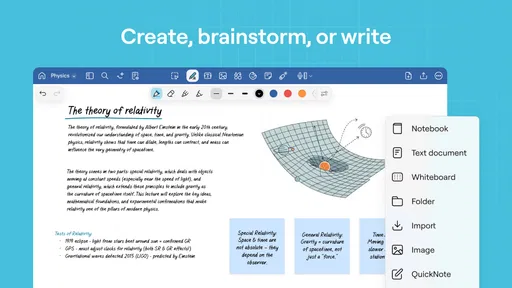
The moment you open the app, you're greeted with a clean and user-friendly dashboard. Trust me, it’s like a breath of fresh air compared to the cluttered interfaces of some other apps. You can easily create new notebooks, import PDFs, or dive into your existing documents with just a tap.
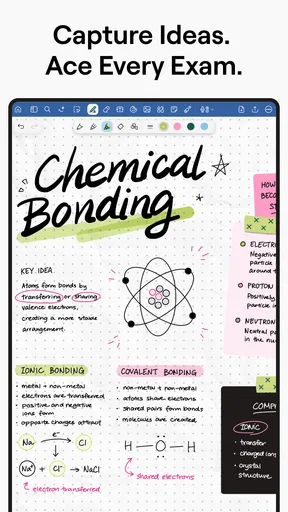
What I love is the ability to customize notebooks with different covers and paper types. Whether you prefer lined paper for notes or blank pages for sketches, Goodnotes has you covered. Plus, the app’s smooth scrolling and page transitions make navigating through documents a real pleasure.
Worth Reading Before You Choose

EA SPORTS FC Mobile 26 Is a Bigger Football Game, but It Takes Time

Flipboard Shows What News Apps Must Do Beyond the Feed

Switching to Android Auto Means Rethinking Your Driving Routine

Google Calendar Makes a Crowded Week Easier to Manage

Ludo King Makes the Most of the Minutes Between Plans

Baby Panda World Brings Quick Play to Modern Phones, but Its Game Library Feels Busy
A practical way to keep the dashboard useful is to make the notebook structure follow your work rather than your mood. I would separate ongoing material from one-off reading, then use a consistent naming habit for meetings or courses. That small choice pays off when a notebook grows: a distinctive cover is nice, but a clear title is what helps me pick the right file quickly.
For a busy day, I might create one notebook for a project and use its pages for meeting notes, rough diagrams, and decisions, while keeping source documents nearby for reference. The trade-off is that a notebook can become a catch-all if I never revisit it. I find it helps to end a session with a short heading or summary on the page, so the important point is visible when I return rather than buried in a long trail of handwriting.
AI-Powered Search
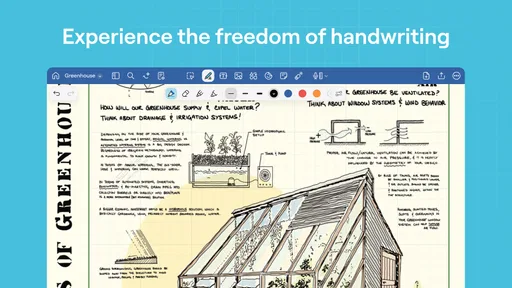
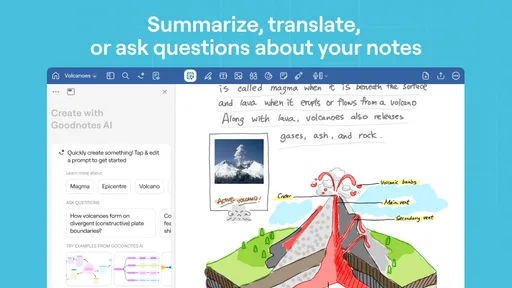
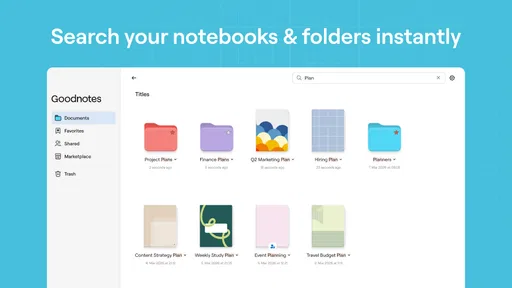
Now, let’s discuss the AI aspect. Imagine typing a keyword and having the app instantly pull up every relevant note, PDF, or document. It’s like having a search engine tailored just for your notes. The AI feature recognizes handwriting too, which is a lifesaver for those of us who prefer jotting things down manually.
This feature ensures you never lose track of important information again. Even if you scribbled something in the corner of a page, Goodnotes will find it. Honestly, it feels like magic.
Search is most useful when I treat handwriting as searchable working material rather than trying to make every page look polished. A quick note from a call can stay rough if I give it a recognizable topic or date; later, a distinctive term may be easier to search than a vague label such as “notes.” I would test this with my own handwriting and vocabulary before trusting it as the only way to retrieve important details.
There is a useful distinction between finding a word and understanding the context around it. Search can point me toward a page, but I still need to read the surrounding notes and decide what matters. For dense study material, I would keep headings and spacing clear so a result is easy to scan. Handwriting recognition is convenient, not a reason to abandon organization altogether.
Annotation and Collaboration
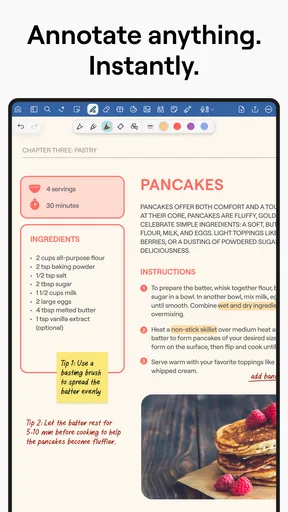
Annotating PDFs has never been easier. With a variety of tools at your disposal, including highlighters, pens, and even stickers, you can mark up your documents however you like. It’s perfect for students or professionals who need to review and comment on documents regularly.
And if you're working in a team, Goodnotes allows you to share documents with others. Collaborators can add their own annotations, making it a fantastic tool for group projects or team meetings. It's like having a virtual whiteboard everyone can contribute to.
A realistic use is preparing for a class or project meeting: I can read a PDF beforehand, highlight passages that need attention, and add questions directly beside them. During the discussion, those marks give the group a shared starting point instead of making everyone hunt through separate messages. For collaborative work, I would agree on a simple convention—such as using initials or distinct annotation styles—so comments remain understandable when several people contribute.
PDF markup is not the same as editing the original text of a document. I see this as a strength when the goal is review, study, or feedback, but it may be the wrong tool if I need to rewrite a report or manage formal document revisions. In that case, I would use a document editor for the actual changes and keep Goodnotes for reading and handwritten commentary.
Seamless Cloud Integration
Goodnotes also integrates effortlessly with cloud services like iCloud, Google Drive, and Dropbox. This means your notes are always synced across all your devices. Forgot your tablet at home? No worries, just access everything from your phone or computer.
The automatic backup feature gives peace of mind, knowing your data is safe and sound. It’s like having a digital safety net for all your important documents.
For anyone switching from paper, the key question is not only where files are backed up, but how the new routine will work across devices. I would start with a small set of current notebooks and make sure they appear where I expect before bringing in years of old material. That is a low-stress way to check that my chosen cloud setup fits how I move between a larger screen and a phone.
Cloud syncing and backup are helpful, but they do not remove the need for sensible housekeeping. I would keep important source files in an orderly place and avoid assuming that every device always has the same immediate access to everything. If my work depends on a particular document during travel or a meeting, I would check it ahead of time rather than discovering a sync snag at the last minute.
Customization Galore
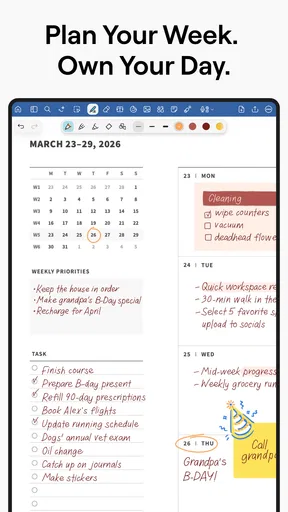
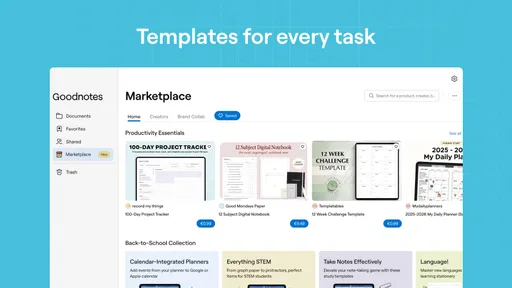
One of the standout features of Goodnotes is its customization options. From a rainbow of pen colors to various paper templates, you can tailor your note-taking experience just the way you like it. For those who love adding a personal touch, the app also supports importing custom templates and stickers.
This flexibility makes note-taking not only productive but also a fun and creative process. Whether you’re a minimalist or someone who loves a splash of color, Goodnotes caters to all styles.
My advice is to keep decoration functional. A small color system can make action items, definitions, and open questions easier to spot, but too many colors can turn review into visual noise. I would choose a few consistent marks and use them across notebooks; then a page from last month is easier to interpret without remembering a different scheme for every subject.
Templates are most valuable when they save repeated setup. If I take similar meeting notes each week, a familiar page layout can remind me to capture decisions and next steps. For occasional brainstorming, a blank page is often better. Customization should reduce friction, not become another project that delays getting the thought down.
A Word on Usability
While Goodnotes is packed with features, it remains incredibly easy to use. The learning curve is minimal, which is a huge plus for those who want to dive right in without fussing over tutorials. The developers have done an excellent job of balancing functionality with simplicity.
From students to professionals to casual users, anyone can benefit from incorporating Goodnotes into their daily routine. It’s like having a Swiss Army knife for your digital life.
That broad appeal does not mean it suits every workflow equally. A student who annotates readings and revisits handwritten lecture notes is likely to get more from the notebook format than someone who mainly needs shared task lists. A designer or planner may enjoy the open-ended pages, while a person who needs structured databases, automated reminders, or tightly managed team assignments may be better served by a tool built specifically around those jobs.
Goodnotes has an average rating of 3.8 from around 28,000 ratings, and it has been installed over a million times. I take that as a sign that it has reached a substantial audience, not as proof that every workflow will feel effortless. The app was released on August 3, 2023, and its broad feature set is most persuasive when I will regularly use more than one part of it—handwriting, document markup, or organized notebooks.
What switching really asks of you
Moving from paper or another notes app is less about importing files and more about changing habits. I would first decide which notebooks deserve a permanent home, then bring over active projects and reference documents rather than copying every old page at once. A digital archive is only helpful if I can tell what is current, what is reference, and what can be left behind.
If I already rely on a simple text notes app, the switch may feel like extra ceremony for quick thoughts. If I have a collection of marked-up readings or handwritten class notes, the page-based approach can make the move worthwhile. I would keep the old workflow available while trying Goodnotes with one real project; that gives me a fair comparison without risking a sudden change to how I capture everything.
One question worth settling early is whether the phone experience suits the way I need to review material. A phone is convenient for checking a page or finding a reference while away from a desk, while sustained handwritten work is naturally more comfortable on a larger writing surface. I would test both parts of my routine before deciding that one device can replace all the others.
Who I would recommend it to
I would recommend Goodnotes to people who think on the page: students reviewing PDFs, readers who annotate, and professionals who want meeting notes and reference documents gathered in a notebook-style space. It is especially appealing when handwriting and document markup are regular parts of the same day, rather than occasional extras.
I would steer someone toward a simpler notes app if speed and plain text matter more than page layout. I would also look elsewhere if the main need is task tracking, structured records, or editing long documents with other people. Those are different jobs, and a notebook can support them only up to a point.
The app is free to start, which lowers the barrier to trying it, but I would review the in-app purchase choices against my actual needs before paying. The useful question is not whether an upgrade sounds attractive; it is whether the feature I would pay for solves a recurring problem in my own routine. That keeps the decision practical and avoids paying for capacity or extras I will rarely use.
My recommendation
In conclusion, Goodnotes: AI Notes, Docs, PDF is more than just a note-taking app; it’s a comprehensive tool that enhances productivity and organization. With its user-friendly interface, powerful AI features, and extensive customization options, it stands out as a must-have app for anyone looking to keep their digital life in order.
So, if you’re tired of losing track of your notes or juggling multiple apps to manage your documents, give Goodnotes a try. It might just become your new favorite tool.
My clearest recommendation is to begin with one class, project, or recurring meeting and see whether the notebook format makes your notes easier to revisit. If you already annotate PDFs or prefer handwriting, I think it is worth a try. If you mostly need fast typed reminders or coordinated team tasks, a more focused alternative will probably feel lighter. The right choice is the one that makes your everyday information easier to use, not simply the one with the most options.
Pros
- User-friendly interface for easy navigation.
- AI-powered search enhances document retrieval.
- Seamless PDF annotation and editing features.
- Syncs across devices for continuous workflow.
- Rich template library for various document needs.
Cons
- Limited free version functionality.
- Requires internet for some AI features.
- Occasional sync delays between devices.
- No handwriting recognition for all languages.
- Subscription model can be costly over time.
FAQs for Goodnotes: AI Notes, Docs, PDF
What features does Goodnotes offer for note-taking and document management?
Goodnotes provides a comprehensive suite of tools for note-taking, including handwriting recognition, text conversion, and extensive organizational features. Users can annotate PDFs, create digital notebooks, and sync notes across devices. The app also supports collaboration, allowing users to share notes with peers and work together in real-time.
Is Goodnotes compatible with both Android and iOS devices?
Goodnotes is primarily designed for iOS devices, including iPads and iPhones, to leverage the Apple Pencil's capabilities. Currently, it does not have a dedicated Android version, which might limit accessibility for Android users. However, users can explore similar apps on the Android platform that offer comparable features.
Does Goodnotes offer cloud storage and synchronization?
Yes, Goodnotes supports cloud synchronization, allowing users to back up their notes to iCloud or other cloud services like Google Drive and Dropbox. This feature ensures that your notes are safe and can be accessed from any compatible device, providing seamless integration across your digital ecosystem.
How does Goodnotes utilize AI to enhance the user experience?
Goodnotes integrates AI to improve handwriting recognition and text conversion accuracy. The AI learns from user input, adapting to individual handwriting styles for better results. Additionally, AI features assist in organizing notes, offering smart suggestions, and enhancing search functionality, making it easier to find specific content quickly.
What are the limitations or challenges associated with using Goodnotes?
While Goodnotes offers robust features, it is currently limited to iOS devices, which may pose a challenge for those using Android. Some users might find the initial learning curve steep due to the extensive feature set. Additionally, the app requires a one-time purchase, which may not be ideal for users seeking a free note-taking solution.


